

Routing
Routing is configured visually in the console. You build a route as a fallback chain: each tier can be a single backend, a load-balanced pool, a conditional branch, or another model group.
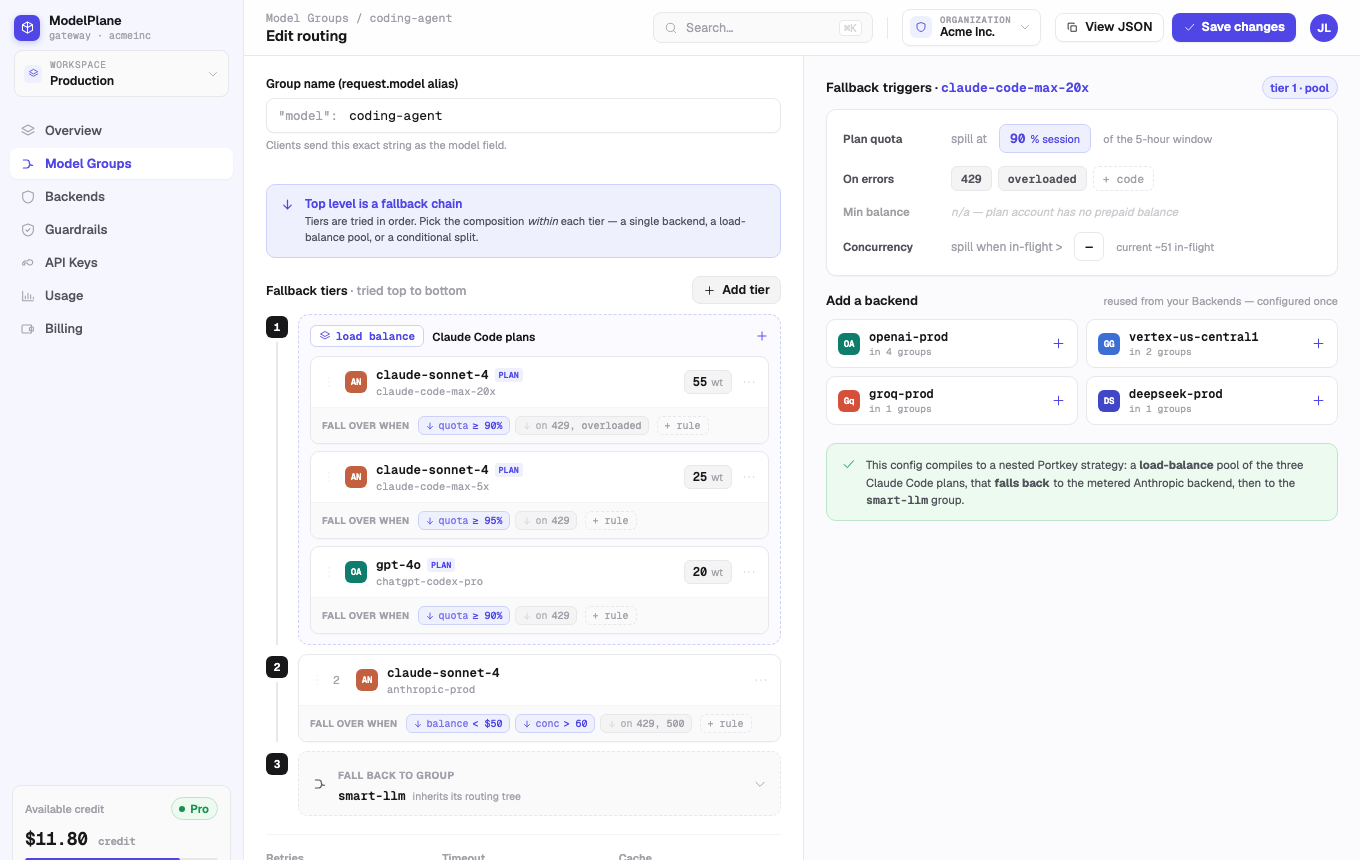
What Routing Controls
Fallback Order
Choose the order in which ModelPlane tries backends when a provider fails, times out, or reaches a threshold.
Load Balancing
Split traffic across several compatible backends to use plan capacity or distribute provider load.
Conditional Branching
Send requests to different paths by user tier, workload type, model need, or product metadata.
Safety Triggers
Move to the next tier based on errors, plan quota, budget, or live concurrency.
Common Routing Patterns
Plan First
Put coding-plan backends in the first tier. Add a metered backend as the next tier so users continue working when plan quota is close to exhausted.
Provider Resilience
Use a strong primary provider first, then add backup providers for rate limits, outages, or timeouts.
Cost Control
Send routine workloads to a lower-cost pool and reserve premium models for high-value or complex tasks.
Customer Tiering
Use conditional branches to give paid users higher-capability models while keeping free users on efficient defaults.
Concurrency-Based Routing
How it works: Any backend can carry a concurrency limit — the number of in-flight requests the gateway will send it at once. Once a backend is at its limit, the gateway treats it as unschedulable for the next request and moves to the following tier, the same way it would for an error or a timeout.
How to use it: Set a concurrency limit on a backend, then place a backend with more headroom (or no limit at all) behind it in the same fallback route.
Why it matters: The most expensive infrastructure you run is capacity you paid for that sits idle — a private cluster or reserved endpoint sized for peak traffic, running at a fraction of that the rest of the time, while any burst over its real ceiling still gets sent to it and queues, times out, or degrades instead of overflowing somewhere that has room. An autoscaler doesn't fix this either: it reacts after a spike arrives, and that lag is exactly when requests queue or fail. A concurrency limit is evaluated per request, so the overflow decision is instant, not "wait for a new instance to come up."
Plan- and quota-based fallback cover "this account is out of budget." Concurrency limits cover a different, load-shaped problem, and open up two patterns:
- Mixing private and public capacity. Put a self-hosted or privately hosted model first, capped at the concurrency it can actually sustain. Traffic beyond that spills over to a public provider automatically — no need to guess capacity up front or manually shed load when it's exceeded, and no idle private capacity paid for and unused.
- Using coding plans in production. Coding-plan accounts usually tolerate far less concurrency than a metered API account. Capping a coding-plan backend and pairing it with a metered fallback lets that plan capacity serve real production traffic under normal load, while anything past its limit fails over cleanly instead of hitting an unpredictable rate limit at the provider — something that wasn't safe to do with quota-based fallback alone.
Concurrency limits compose with everything else in this page: chain more than two tiers, each with its own limit; combine with conditional branching so different traffic sources get different capacity priority; or combine with weighted load balancing, where the limit acts as a hard ceiling and the weight as a soft preference beneath it.
Review Before Publishing
Use the model group detail page after saving a route. Confirm that fallback markers, quota meters, spend, error rate, and latency match your expectations.