

Quickstart
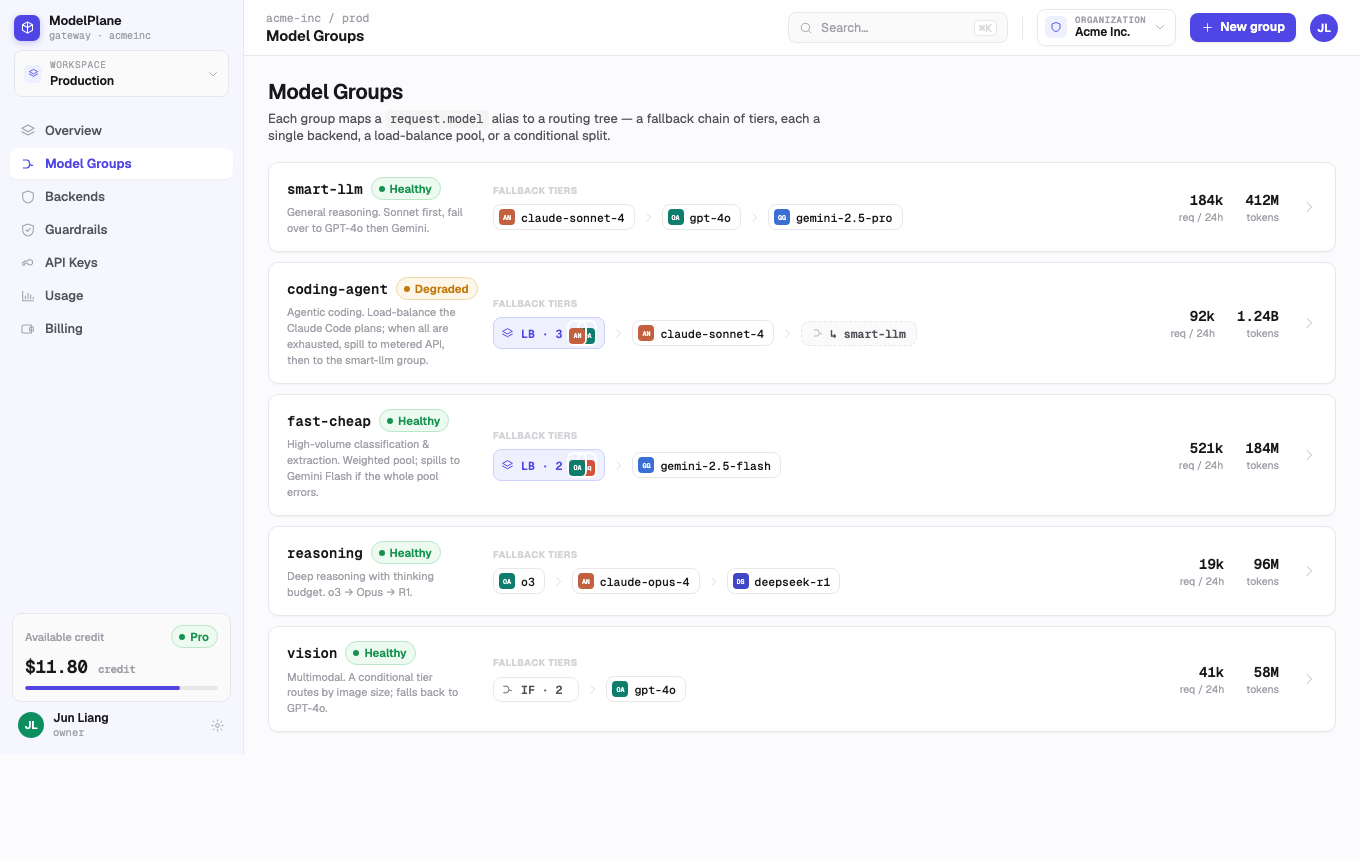
ModelPlane is managed from the web console at https://app.modelplane.dev. Use the console to add provider accounts, assemble model groups, set routing rules, monitor usage, and review billing. Developers only need the final model name when they make LLM calls.
First Setup
- Open the ModelPlane console at
https://app.modelplane.dev. - Go to Backends and add the provider accounts or coding plans your team wants to use.
- Go to Model Groups and create a model group for each product use case.
- Open the routing editor to choose the fallback order, load balancing pool, and safety triggers.
- Share the model group name with developers so they can use it in LLM calls.
What You Configure in the UI
Backends
Reusable provider accounts, custom compatible endpoints, and coding-plan accounts.
Model Groups
User-facing model aliases such as coding-agent, smart-llm, or fast-cheap.
Routing
Fallback chains, load balancing, conditional branches, budget limits, quota triggers, and concurrency triggers.
Usage
Traffic, tokens, spend, errors, latency, and attribution by API key, group, backend, or model.
Recommended Rollout
Start with one reliable backend and one model group. After the first integration is stable, add fallback tiers and usage alerts. For coding-heavy workloads, put coding-plan backends first and metered provider accounts later in the fallback chain.