

Billing and Plans
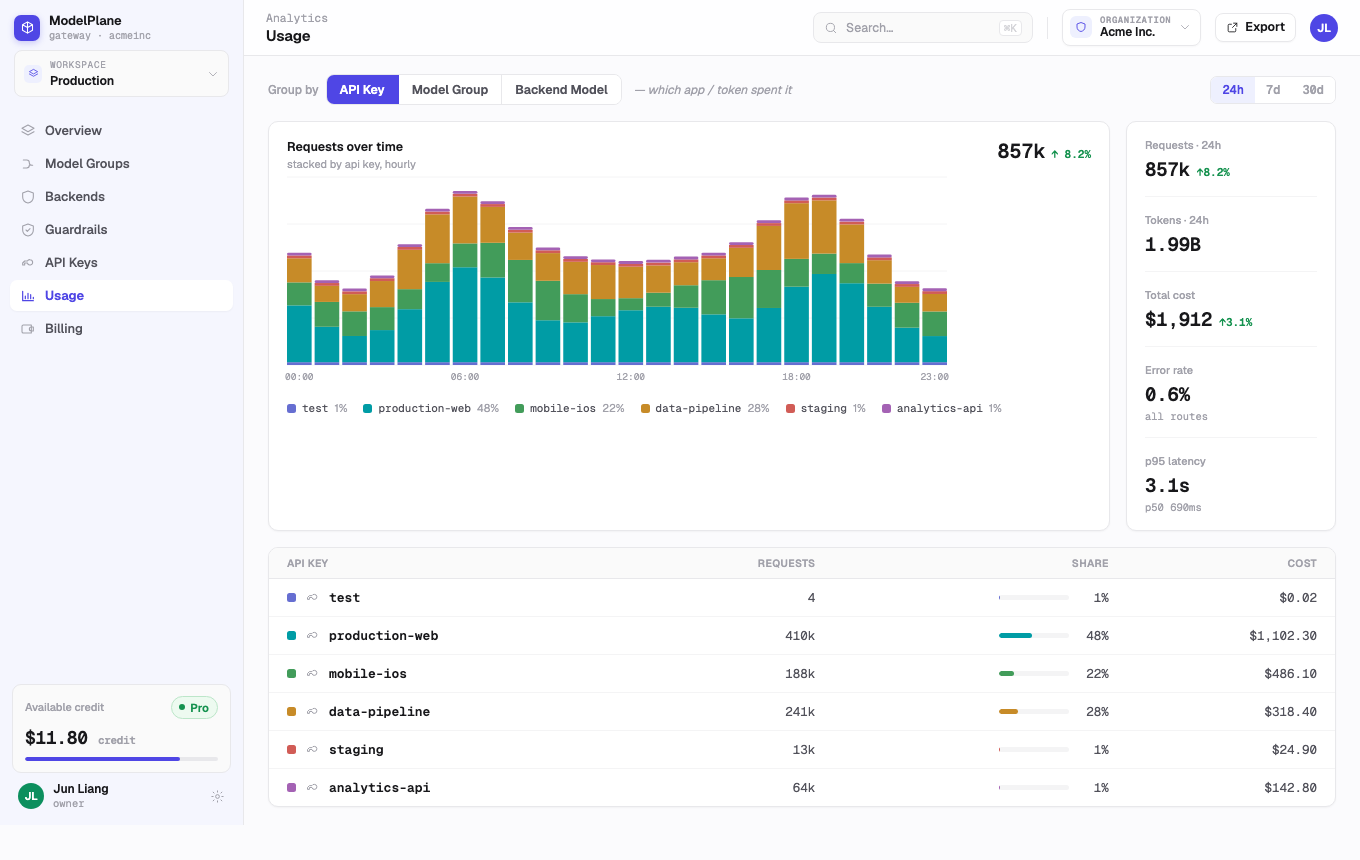
Billing is managed from the Usage and Billing areas of the console. The goal is to understand spend by product workload, workspace, provider account, model group, and API key.
Plans
ModelPlane currently has two user-facing plan states:
| Plan | What it is for | Included credits | Workspace behavior |
|---|---|---|---|
| Free | Trying the gateway and running one personal workspace | Signup credits only | Your personal Default Workspace stays active. You cannot create extra personal workspaces. |
| Startup | Production usage, more API keys, and multiple personal workspaces | Monthly paid credits | You can create extra personal workspaces. Organization workspaces also require a paid Startup subscription. |
Organizations do not have a Free plan. Creating an Organization starts a paid checkout, and the Organization becomes active after the first payment succeeds.
Billing Accounts and Credits
Credits belong to a billing account, not to an individual workspace.
- Personal workspaces spend from your personal billing account.
- All workspaces inside the same Organization spend from the Organization billing account.
- Usage is still attributed by workspace, API key, model group, backend, and model so you can understand where spend came from.
- Inference calls are blocked only when the billing account runs out of available credits or the API key itself is inactive.
Auto Top-Up
Startup plans use auto top-up to keep production traffic from stopping unexpectedly.
- Auto top-up is required on paid plans.
- You can change the threshold and top-up amount.
- You cannot turn auto top-up off while the paid plan is active.
- Manual top-ups add credits to the selected personal or Organization billing account.
Downgrading a Personal Account to Free
You can downgrade a personal paid account to Free even if you have created multiple personal workspaces.
When the downgrade happens:
- The Stripe subscription is canceled immediately.
- Your personal Default Workspace remains active under Free entitlement.
- Extra personal workspaces are suspended instead of deleted.
- Suspended workspaces keep their data, but configuration changes such as editing backends, model groups, API keys, or workspace settings are blocked.
- Existing active API keys can still serve inference while the personal billing account has credits.
- Once credits are exhausted, inference returns an insufficient credits error.
If you subscribe again later, workspaces that were suspended only because the owner plan became inactive are restored. Workspaces you archived yourself are not automatically restored.
Payment Failure
Payment failure is handled differently for personal accounts and Organizations.
For a personal paid account:
- The account falls back to Free.
- The Default Workspace remains available.
- Extra personal workspaces are suspended.
- Existing active keys can still run inference while credits remain.
For an Organization:
- ModelPlane first tries to use the Organization's available credits to settle the failed subscription invoice.
- If the available credits are enough, the Organization stays active and the invoice is marked as settled.
- If credits are not enough, the Organization becomes suspended and its active workspaces are suspended.
- A suspended Organization can still reach billing recovery, payment-method, and billing-portal actions.
- Existing active API keys can still run inference while Organization credits remain; admin/config changes are blocked until billing is restored.
Organization Cancellation and Close
An Organization cannot downgrade to Free. Closing an Organization cancels its Stripe subscription and marks the Organization closed. Existing data is retained for history; workspace resources are not deleted as part of billing cancellation.
What You Can Track
- Request volume.
- Input, output, and total tokens.
- Spend and credit consumption.
- Error rate and latency.
- Usage by API key, model group, backend, or model.
- Coding-plan quota and reset windows where supported.
How to Read Usage
Use model-group views to understand product cost. Use backend views to find provider account pressure, low balance, rate limits, or plan exhaustion. Use API-key views to attribute traffic to applications, environments, or customers.
Plans and Credits
ModelPlane can show both gateway-level credits and provider-level plan or balance information. Credit-based backends show remaining spend balance when available. Coding-plan backends show quota windows and reset timing when the provider exposes them.
Operational Recommendations
- Set a budget expectation for each production model group.
- Review coding-plan quota after heavy coding-agent usage.
- Watch backend-level errors before they become product-wide failures.
- Use fallback routing for any provider account with limited quota.
- For Organizations, monitor shared credits because every workspace in the Organization spends from the same balance.
- Keep a valid payment method on paid accounts so workspaces do not move into suspended billing recovery mode.